Chop Bot
Chops your inbox, calendar, and X replies down to what matters: one daily brief, follow-up nudges, and heads-ups on comments you haven’t answered. It drafts; you send.
Install Grok Bot first, then tap Add.
AI desk tools for solo founders and trade crews
Free Grok bots for the desk. Real sites and apps for the crew.
Free templates · start here
Not sure which bot fits? Use the finder, then come back and tap Use free.
Chops your inbox, calendar, and X replies down to what matters: one daily brief, follow-up nudges, and heads-ups on comments you haven’t answered. It drafts; you send.
Install Grok Bot first, then tap Add.
Sorts your Gmail or Outlook into Act now, Reply soon, FYI and Noise, and sends you one short list. Drafts replies, but nothing sends without your yes.
Install Grok Bot first, then tap Add.
One lead SI sets up a small crew for inbox triage, meeting prep and a SaaS spend check, then sends you one morning brief. Drafts only, nothing goes out without your yes.
Install Grok Bot first, then tap Add.
Before each outside meeting, sends you a one-screen brief on who you're meeting and what you've already discussed.
Install Grok Bot first, then tap Add.
NEW
Turns a role into a draft job post, scores applicant emails against your must-haves, suggests interview slots and sends a weekly pipeline digest. Nothing sends without your yes.
Install Grok Bot first, then tap Add.
NEW
Reads portal lead emails, drafts a fast first reply and follow-ups, suggests showing slots and writes the weekly seller update. Drafts only.
Install Grok Bot first, then tap Add.
NEW
A free front desk for trades: turns missed calls, voicemails and web forms into drafted callbacks plus one morning call-back list.
Install Grok Bot first, then tap Add.
NEW
Reads contracts and gives a plain-words summary: term, renewal, auto-renew, notice window and risky clauses. Not a lawyer — drafts and reminders only.
Install Grok Bot first, then tap Add.
Finds the buyers hiding in your X replies and drafts the answer. Nothing posts without you.
Install Grok Bot first, then tap Add.
Catches every new lead from your inbox, DMs and forms, sorts it, and hands you a draft follow-up. Read-only, drafts only.
Install Grok Bot first, then tap Add.
Checks your competitors' public pages and sends one short digest of what actually changed, with a source link for each.
Install Grok Bot first, then tap Add.
A sharp thinking partner that argues the other side and runs a pre-mortem before you commit to a decision, contract, launch, or big spend.
Install Grok Bot first, then tap Add.
Turns your week of real work into ready-to-post X drafts. Nothing posts without you.
Install Grok Bot first, then tap Add.
NEW
Watches X for algorithm, payout and niche changes and brings back only what you can use, with a source link each time. Read-only.
Install Grok Bot first, then tap Add.
Turns one approved photo into short videos where your face stays the same in every shot. Free face-ID check included.
Install Grok Bot first, then tap Add.
Packages a finished video: titles, description, chapters and tags from your transcript.
Install Grok Bot first, then tap Add.
NEW
Daily SI for limited-input living: numbered menus for errands, home, messages, health and safety. Nothing sends without your yes.
Install Grok Bot first, then tap Add.
NEW
Track wheelchair, CPAP & AAC gear — drafts only, you send.
Install Grok Bot first, then tap Add.
NEW
Never miss the date — deadline confirm, calendar or .ics, case folder in your Drive.
Install Grok Bot first, then tap Add.
Every grade, note & deadline, caught.
Install Grok Bot first, then tap Add.
Check and control your Apple Home from chat: lights, switches, fans, blinds, locks, garage doors and thermostats.
Install Grok Bot first, then tap Add.
Shows your weekly usage limit, your pace, and which routines burn the most, then warns before big jobs. Nothing changes without your yes.
Install Grok Bot first, then tap Add.
Puts your SIs (Grok, ChatGPT, Gemini, Claude and Copilot) on one private GitHub repo, so they share the same files, notes and handoffs. Nothing pushes without your yes.
Install Grok Bot first, then tap Add.
Coordinates your other bots so you only hear from one of them.
Install Grok Bot first, then tap Add.
Reads your subscription receipts and shows every tool you pay for, what it costs, and where you're overpaying.
Install Grok Bot first, then tap Add.
A read-only security check for your Grok Bot setup. Scans for exposed secrets, risky dependencies, open permissions and unapproved bot actions, then reports only what is new, worse or fixed.
Install Grok Bot first, then tap Add.
NEW
Audits a Grok Bot template for ask-first rules, honest claims and import readiness. Read-only report — nothing changes without your yes.
Install Grok Bot first, then tap Add.
NEW
Sets up four starter helpers one at a time for people new to Grok Bot. Day 7 brings a short recap. Each only on your yes.
Install Grok Bot first, then tap Add.
NEW
Turns bugs, requests and ideas from mail, X or Slack into cards on GitHub Projects, Linear, Trello or Notion. One card at a time.
Install Grok Bot first, then tap Add.
NEW
From template to app or companion UI. Fit card first, then ship.
Install Grok Bot first, then tap Add.
Tell me what you need a bot to do. I build a custom Grok Bot template around your workflow, then hand it back ready to import.
Install Grok Bot first, then tap Add on any card. Try it apps stay in your browser — no send, post, or buy.
Built something with one of these? Tell me on X @CaliLumberJack.
Proof · real work
Website · live
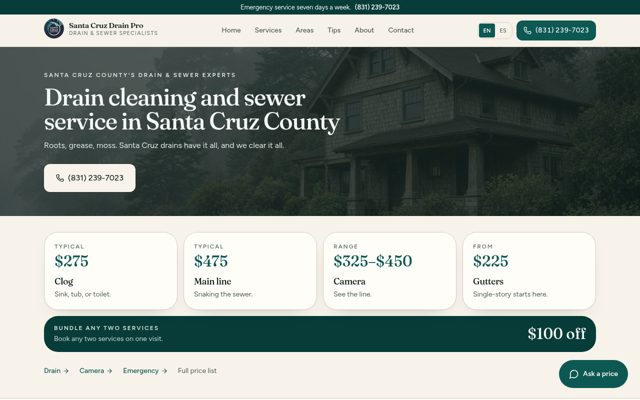
Bilingual English and Spanish site with SEO setup and a lead form.
Demo site
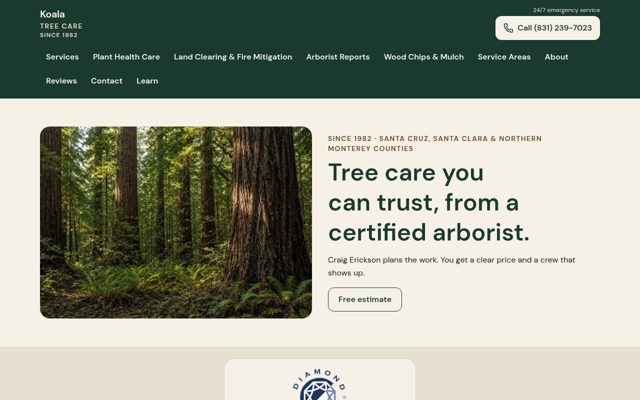
Demo for a certified arborist: services, service areas and a request form on one clear, mobile-first site.
Web app · private
Private · invite-only
Internal app the crew actually uses.
Private to the client. No public link.
Lines
Bot templates are always free. Custom builds are paid.
Shop
Instant downloads and done-for-you installs.
Pay with X Money: send payment to @CaliLumberJack in the X app, then email your order and the X Money transaction ID (or a receipt screenshot) to calix.build@gmail.com. Save 5% on orders of $500 or more.
Free / pay what you want
Start an SI desk without paying first.
$39 each
One pack per trade.
Roofing, HVAC, plumbing, cleaning, electrical, landscaping, restoration, mobile auto, property managers
See all Night Desk packs$49
Run the desk day to day.
$39
A kit to install SI desks for your clients.
$29
From the inbox to a number.
$25
Posts in your voice.
$19
Twelve ready-to-send emails that win the job.
$12
Prompts for the video.
$500
We install it. You stay on the work.
Free
Usage CFO for Grok Bot.
Open source, in testing
Private beta · $29/mo
Mail, drive, file drop, and calendar in one app, built for bots. Every person gets an isolated inbox, drive, and calendar, and bots drop files and messages into a Drop zone through an API, with an audit log of who wrote what.
3 free tester seats open this month. Run Atlas on real work for 30 days, then decide.
FAQ
No. They draft; you send. Xcavator drafts the reply and nothing posts without you. Bridge Bot pushes nothing without your yes.
Take the four-question bot finder at /bot-finder. It points you to one template that matches the problem.
No. Desk is the front. Jobber is connected now (booked visits push over). For Housecall Pro, ServiceTitan, Workiz and Service Fusion we don't claim a live hook yet; Custom can wire the one you use.
Custom builds are Starter $299, Business $999, Character / Video bot $1,499, Install & setup $500, and Optional Care $99/mo. Request one at /custom-bot. Bot templates are always free. Custom builds are paid.
Name, phone, six services, cities, photos, license. That's the whole brief. We point your domain; the site is yours.
Optional Care is $99/mo for upkeep and updates.
You get a fixed quote first, then pay with X Money. Pay @CaliLumberJack in the X app. Orders of $500 or more save 5%.
Yes. Send a custom template request at /custom-bot and I build a Grok Bot template around your workflow, ready to import.
Yes. A later custom build is Starter $299, Business $999, Character / Video bot $1,499, or Install & setup $500. Optional Care is $99/mo. Bot templates stay free.
Yes.
The Desk sits in front of it.
Contact
One person reads every message.
@CaliLumberJack on X. CalixBuild.com
@CaliLumberJackBuilt something with my template? Tell me. I read every one.